
Resolution Process
Step 1: Identify the Issue
- Review the shared Missing Parcel Account list.
- Identify affected client(s) and account(s).
- Determine the issue type (see section below).
- Locate the AP contact in Salesforce.
✅Tip: Always confirm why access is failing before contacting the customer.
Common Parcel Access Issues
Use the accordions below to quickly identify the issue and required action.
▶️Billing Center Error
📄Issue Description
Login credentials work, but invoices are not visible in the billing center.
🚨Required Action
- Contact the customer
- Request they re‑grant AFS access to the affected account(s)
- Confirm invoice visibility after update
▶️Incorrect Login / Password
📄Issue Description
Saved login credentials are no longer valid.
🚨Required Action
- Request updated credentials from the customer
- Validate access immediately
▶️Account or CPP Removed from Login
📄Issue Description
Account or CPP no longer appears under the provided login.
🚨Required Action
- Ask the customer to add the missing account/CPP back to the login profile
- Confirm visibility after update
▶️Not Set Up to Create Reports
📄Issue Description
Billing center does not allow invoice or report creation.
🚨Required Action
- Instruct the customer to contact their carrier representative
- Carrier must enable report creation permissions
⚠️ Important: This cannot be resolved by AFS directly.
▶️UPS Verification Email Required
📄Issue Description
UPS sends a one‑time verification code to the email on file during login.
🚨Required Action
- Ask the customer to provide the code promptly
- Confirm access once verified
☎️Customer Outreach & Escalation
Attempt 1
- Phone AP contact
- Leave voicemail if needed
- Send follow‑up email
⏱ Wait 24 hours
Attempt 2
- Repeat phone + email
⏱ Wait 24 hours
Attempt 3
- Contact Controller or VP of Finance
⏱ Wait 24 hours
Escalation
- Escalate to CET Manager for guidance
Do not allow unresolved access issues to stall processing without escalation.
📁Internal Documentation & Updates
CET Associate Responsibilities
- Update the shared spreadsheet daily
- Log:
-
- Date
-
- Attempt number
-
- Contact method
- Post relevant updates in the Teams channel or create internal case where applicable
Email Templates
Use the saved HubSpot email templates below. Do not modify language without approval.
▶️Access Removed – UPS
Subject: ups.com access // we’re monitoring your bills
Hi (first name)
I’m (my first name) with AFS (afs.net). We monitor your UPS accounts for late deliveries,
billing errors and savings opportunities.
We’ve lost access to your account (xxxxx) as of (issue date).
To perform our automated scan weekly, we need your help to reinstate our access to UPS.com.
It is likely the password was reset. Below are the step by step instructions on how to add AFS as
a user. If you would like, please call me (my email signature is below) to verify that my request
is real.
-
Go to www.ups.com and log in to the UPS Billing Center
-
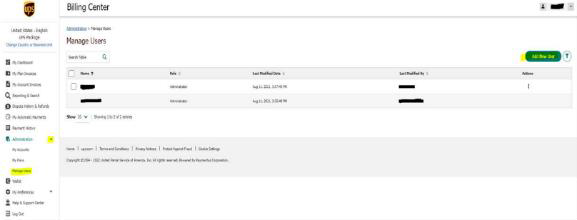
Click on the drop down arrow next to Administration, then click on Manage Users
-
Select Add New User at the right hand corner of the screen
-
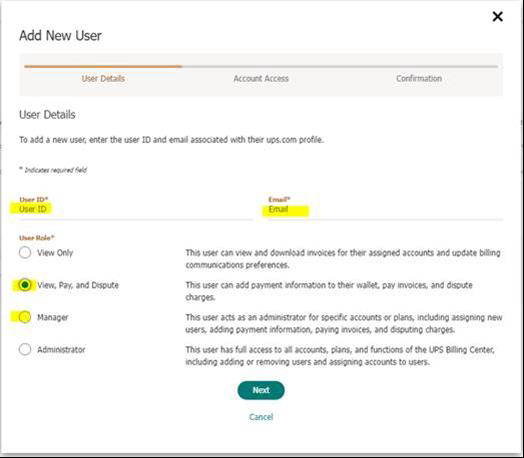
Provide the requested information as well as the role/authority assigned to the user:
-
Access: Manager or View,Pay&Dispute
-
Username: AFSMOMA
-
Email: ups@afs.net
-
-
Once completed, a success message will be displayed. (I will be able to move forward
from here and will advise if I have any questions or concerns.
▶️Access Removed – FedEx
Subject: fedex.com access // we’re monitoring your bills
Hi (first name)
I’m (my first name) with AFS (afs.net). We monitor your FedEx accounts for late deliveries,
billing errors and savings opportunities.
We’ve lost access to your account (xxxxx) as of (issue date).
To perform our automated scan weekly, we need your help to reinstate our access to FedEx.com.
Below are the step by step instructions on how to add AFS as a user. If you would like, please
call me (my email signature is below) to verify that my request is real.
Once you have completed these steps, please confirm with me that the invite has been sent for
your company as well as the name that will appear on the invitation (the name on the invitation
will be the name that appears once you have logged in).
1. Go to www.fedex.com and log in with your user ID and password.
2. Go to “support” and click “view/pay bills”
3. Go to “Administration” and click “manage users.”
4. Click “invite user.”
5. Fill out the new user info and then click “continue.”
First Name: AFS
Last Name: Audit
Email Address: edi@afs.net
Role: Standard
6. Setup new user and finish. When completed, click the “Send Invite” button.
7. AFS accepts invite and completes the setup
Please send an email providing your FedEx account numbers
▶️Access Removed 2nd Email Communication (UPS/FedEx):
Good afternoon,
Following up to request the below access. We’ve lost access to monitor your accounts for carrier
$ errors and potential $$ impacts from frequent UPS and FedEx surcharge increases. Please let
me know if you have any questions!
▶️Missing Parcel Account – Initial
Good afternoon,
Our team has received invoices via EDI for FedEx Account #428559029, # 72274220, and
#428559142. These are not account numbers we have on file for (Client). Can you please
confirm or deny that this account number belongs to (Client), along with the location it pertains
to so that we may make internal updates?
▶️Missing Parcel Account - Follow‑Up
Good afternoon,
Following up to request the below information. We do not have FedEx Account # 204285237on
file for (Client) and are unable to process these invoices. Can you confirm or deny that this
account belongs to (Client)?